How to join Nearby from a browser
Join a meetup from an iPhone or Android browser without installing Nearby or creating an account.
Quick answer
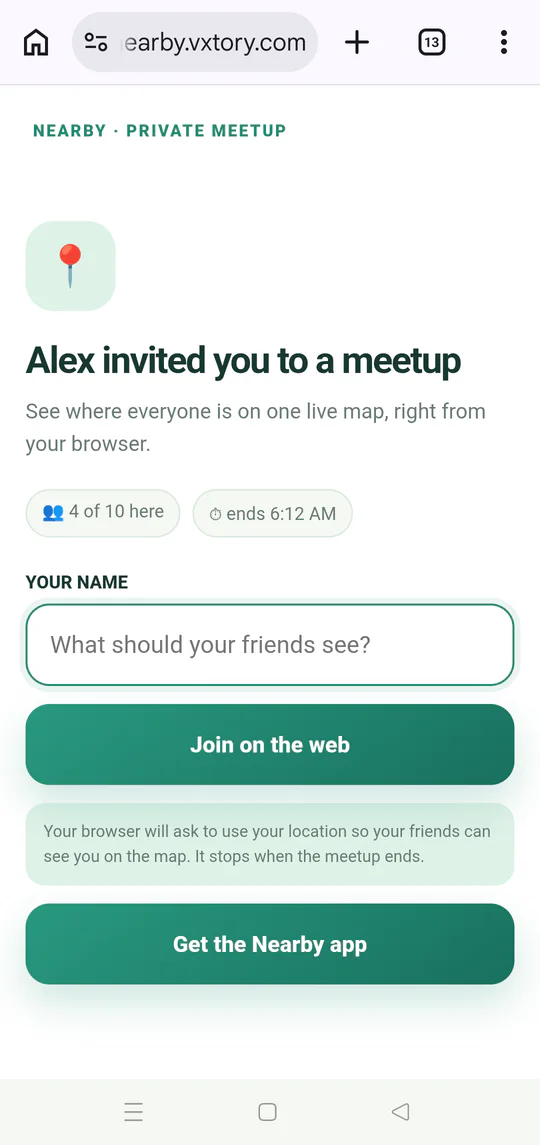
Open the meetup link, enter a display name, tap Join on the web, and allow location only if you want the group to see your position.
Walkthrough
Follow these steps
- 01
Open the link on your phone
Tap the invitation in Messenger, WhatsApp, SMS, email, or another chat app.
- 02
Enter a recognizable name
No email address, phone number, or password is required.
- 03
Tap Join on the web
Use Get the Nearby app only if you prefer to install the Android app.
- 04
Keep the meetup open
Use the destination, shared locations, and chat while the group is coordinating.

Ready to try it?
Start a meetup on Android and send one link to everyone else.