How to use the live map
Read the meeting pin, friend avatars, arrival indicators, and controls while your meetup is active.
Quick answer
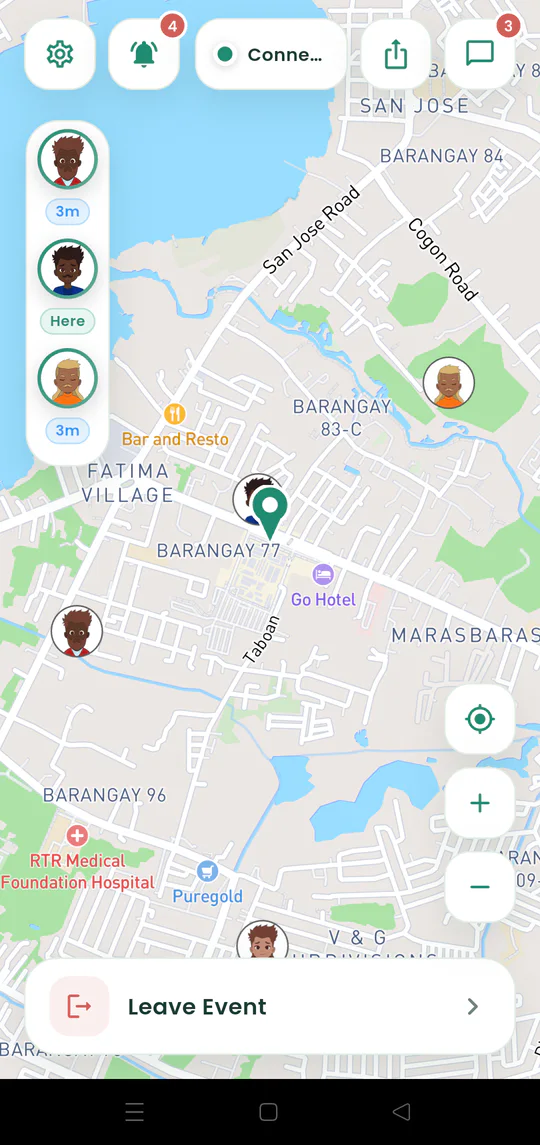
The pin is the shared destination. Friends who enable sharing appear as moving avatars, and the left-side strip shows whether each person is minutes away or already there.
Walkthrough
Follow these steps
- 01
Find the meeting pin
Treat the green destination pin as the place everyone is trying to reach.
- 02
Read the friend strip
The avatars on the side show who is sharing and whether they are minutes away or Here.
- 03
Tap a person for details
Open the ETA card to see distance, arrival information, map focus, and a message shortcut.
- 04
Use the top controls
Open invitations, inbox updates, chat, or Settings without leaving the active meetup.

Ready to try it?
Start a meetup on Android and send one link to everyone else.