How to check a friend’s ETA
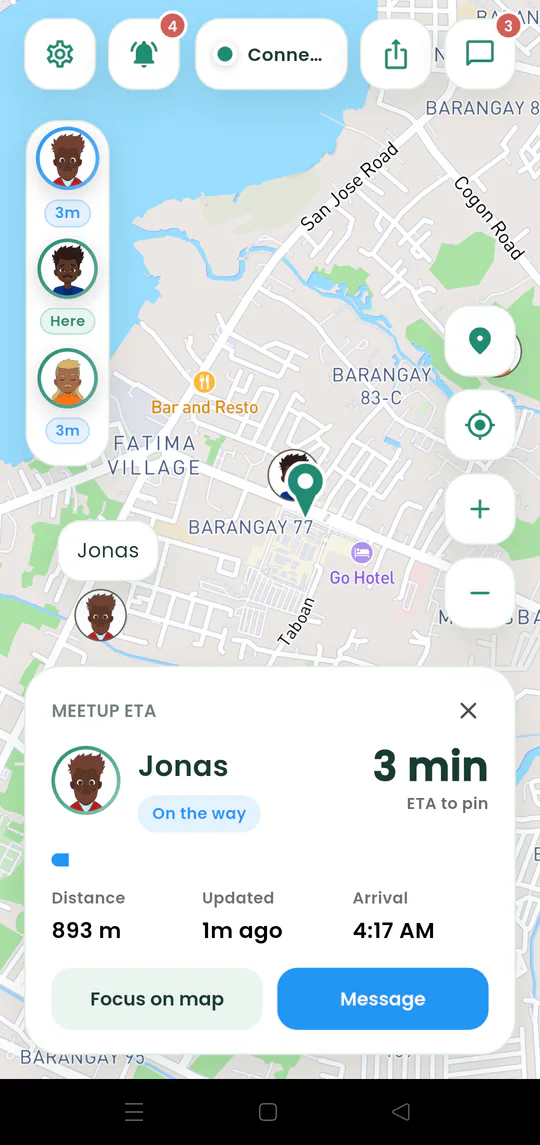
See a friend’s estimated time, remaining distance, arrival time, and position on the map.
Quick answer
Tap a friend’s avatar in the live-map strip. Their Meetup ETA card shows the estimate and gives you Focus on map and Message actions.
Walkthrough
Follow these steps
- 01
Open the active map
Wait until the friend has joined and chosen to share location.
- 02
Tap their avatar
Use the vertical friend strip beside the map.
- 03
Read the estimate
Check the displayed minutes, distance, and expected arrival time.
- 04
Focus or message
Use Focus on map to find the person or Message to open the meetup chat.

Ready to try it?
Start a meetup on Android and send one link to everyone else.